
How Social Engineering Is Evolving Against Operators

As operational technology becomes more connected, attackers are no longer just exploiting systems — they are exploiting trust, urgency, and human permission.
Operational Technology (OT) runs the physical world. It is the control systems that regulate manufacturing lines, power generation, water treatment, pipelines, building automation and more. When operational technology fails it doesn’t just impact business, it impacts lives. As OT and IT become more interconnected, hackers are not just hunting for software flaws. They are increasingly hunting for human permission, whether it is an operator approving a malicious remote session, applying a “vendor update” that is malware disguised as urgency, or seeking to have someone share credentials to someone they shouldn’t due to the urgency to keep production moving. The people who matter most to our operational technology are being targeted the hardest by malicious threat actors who have the intent to steal, destroy and disrupt.

How Social Engineering Differs In OT
In IT, a successful phishing attempt might lead to stolen data, account takeover, or business disruption. In OT, the potential blast radius expands. Compromised access can translate into process disruption, equipment damage, safety risk, loss of public utilities, and costly downtime. Especially when a single account has privileged reach into operational networks.
An IT compromise in a business can hurt a company, but an OT compromise can hurt an entire community. This threat is increased by the operational pressure and legitimate urgency that is faced by the teams that manage operational technology environments. Operators are routinely handling real alarms, maintenance windows, vendor coordination, and crucial issues that cannot wait. Attackers are able to exploit that normal urgency by making malicious requests look like standard operational procedures. The malicious actors also have up to date information on the real issues that are being faced in the operational technology world, so they are able to attack at times of real urgency in order to get their feet into the door of crucial environments.
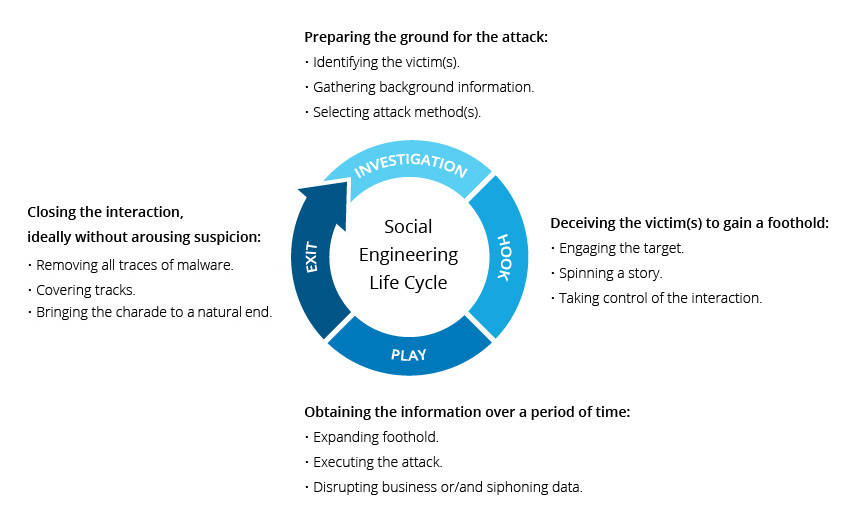
What Social Engineering Might Look Like
Attackers don’t need to create new tricks to get into operational technology environments, they can take familiar scams such as phishing, impersonation, and urgent requests, and wrap them in operational context so they feel like normal work. This might include contexts such as patches, alarms, maintenance, vendor support, and production pressure.
Urgent Vendor Update/ Patch Notice That Pushes You To Click Fast
What you might see: An email that looks like it’s from a vendor or field engineer saying that there is a “critical issue affecting your version, install this update now”. Sometimes followed by a phone call offering to “walk you through it”.
Operator takeaway: Treat it like a controlled change, don’t click the link. Validate the update through the vendor portal / ticketing system you already use, and only proceed after your normal, authorized and secure approval and verification flow.
Maintenance Coordination That Mirrors Real Workflows
What you might see: A message that looks like a normal operational request such as “approve this remote session for diagnostics” or “we need credentials to finish routine maintenance”.
Operator takeaway: Anything that creates or expands access (sharing or creating credentials, granting or authorizing remote sessions, creating firewall exceptions) must have a ticket and go through proper sign-off. This is especially important when the message is trying to rush you.
A Phone Call That Sounds Legitimate
What you might see: A caller claiming to be a vendor representative, engineer, supervisor, or help desk, using correct terminology and procedural language, and pushing urgency. They may use phrases like “this will impact safety,” “crucial emergency patch,” or “we’ll miss the window if you don’t do this now”. With the advances in artificial intelligence, these calls can sound incredibly legitimate.
Operator takeaway: Verify the number that you were called from. Don’t verify their identity using a number or email they give you. Call back using known, trusted and good contact information and require verifiable details, along with your normal and authorized secure approval and verification flow, before granting access. You might go through the vendor’s approved portal, or a system at your company that holds trusted contact information.
Just Enable Remote Access For Troubleshooting
What you might see: A request for the one action that opens the door such as a request to approve a remote session, enable a remote pathway, reset credentials, open a “temporary” firewall rule, or “turn on access just for this fix.”
Operator takeaway: Granting remote access should never be informal. Require strong authentication, tight scope, time bounds, strong verification before granting remote access, and monitoring, and use trusted guidance and frameworks to harden remote access pathways. Make sure to always go through your organization's normal and authorized secure approval and verification flow before granting access.

What Operators & Leaders Can Do
The solution is not to breed a culture of “don’t trust anyone”. It is to build verification into the workflow so that trust can be established without being exploited.
Here are practical solutions that can fit into the reality of operational technology:
Handle Access Like A Controlled Change In operational technology environments, “access” isn’t just an IT convenience, it’s a system change that can alter risk, safety, and reliability. Treat any request that creates or expands access, such as new accounts, credential resets, remote sessions, temporary firewall rules, urgent vendor patches, firmware/logic uploads, and configuration changes as an important change event. Meaning that it is documented, reviewed, approved, executed, and verified.
Confirm Authentication Via A Trusted Channel Social engineers often include a “verification” phone number or email, don’t use it. Instead, when verifying the identity of someone, verify via trusted and known contact details from sources like your vendor portal, internal directory, and contract records and call back using that information. When you connect, ask for verifiable details to help confirm their identity. It is crucial to have a flow that is thorough, and works for your specific operational technology environment.
Harden Remote Access Whether it is a third party vendor, or an onsite operator, remote access tools are one of the most targeted methods to gain unauthorized access. It isn’t enough to train your employees and secure your environment, you need to harden remote access and to require high standards of security for any third party vendor or contractor who has remote access into your critical environments.
Do Scenario Based Training Specific To Operational Technology Generic training on social engineering often misses the point, and becomes a chore to be done rather than a skill to be learned. Run regular drills around realistic phishing lures, such as patch notifications, maintenance calls, vendor diagnostics, urgency safety advisories and more. Then teach the exact verification steps that operators should follow, and test them in real world environments. Use the basic training videos and basic phishing tests to help strengthen your organization, but use specific scenario based training and testing in order to strongly secure your organization from the increasingly mature threats of malicious actors.
Make It Safe To Pause And Check. Operators should be encouraged and rewarded, not punished, for slowing down a suspicious request. Social engineering works best when hesitation feels operationally unacceptable. Incentives matter, when operators know that they are allowed to pause and double check, the defense of the organization will rise.
Yisda Takeaways
Social engineering in operational technology is not a training failure, it is a design challenge. When workflows assume trust without verification, attackers will exploit that gap. But when verification is built directly into access, authentication, and operational processes, trust can exist without becoming a liability.
The goal is not to slow operations or create fear. The goal is to give operators clear, supported paths to pause, verify, and proceed safely even under real pressure. In OT environments where reliability and safety matter most, resilient security is not about saying “no.” It’s about ensuring that every “yes” is intentional, verified, and safe.


Comments